MANAGED SERVERS IN SINGAPORE

Managed servers for business applications.

SGCloudApp hosts and manages servers in Singapore for ERP, inventory and other private business applications. We handle server administration so you do not need to hire a server administrator.

Your software provider continues to support the application.

BUSINESS SERVER HOSTING
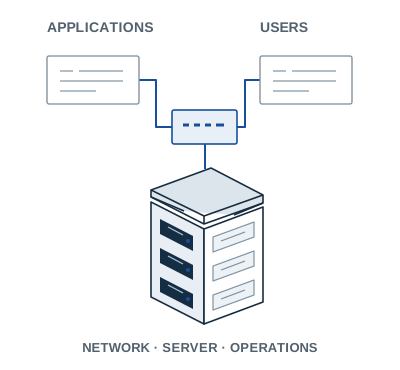
Business applications connected through a network to a server rack.
Applications, network and servers
in a hosted business system.

Services

Server and colocation services

A managed server is the starting point.
Colocation is an option when you need to keep your own hardware.

01Our server hardware

Managed business servers

A server hosted on our Singapore infrastructure, sized for your business application. We provide the hardware and server administration.

When to choose it
You need somewhere to run a business application without buying and maintaining a physical server.
Hardware
Normally a virtual machine on our hardware. A dedicated physical server can be considered if the application requires one.
Plan before setup
Processing capacity, memory, storage, operating system, network access and software licences.
Discuss a managed server
02Your own hardware

Managed colocation

Rack space, power and network connectivity in Singapore for a server you own, with the administration services you need specified before the move.

When to choose it
You need to retain an existing physical server or appliance and want to host it outside the office.
Hardware
You retain ownership. Identify who supplies replacement parts and handles warranty repairs.
Plan before moving
Rack size, power draw, network access and any on-site work or server administration required.
Discuss managed colocation

Responsibilities

Who manages what

We manage the server. Your software provider supports the application, and your business decides who can use it.

Before service starts, the proposal sets out support hours, maintenance windows and backup arrangements: what is backed up, how long it is kept, and who performs and checks a restore. It also names the first contact for incidents and when the software provider needs to be involved.

Server, application and customer responsibilities
WhoResponsibility
SGCloudAppServer & networkServer and network administration, with monitoring, OS patching and backup or restore work as specified in the proposal.
Your software providerApplicationApplication compatibility, configuration, updates and faults; checking that the application and its data work after a restore.
Your businessPeople & dataUser access decisions, software licences, data ownership and approval of maintenance and recovery priorities.

Applications

When to review your server setup

ERP & inventory deployments

A new ERP or inventory deployment may need a private server. Involve the software provider early to confirm the operating system, database and access requirements.

Existing business systems

An office move or an ageing server can be a reason to review hosting for a business system. Check whether the application still needs its own server and what would be involved in moving it.

Software implementers

Deploying software for a customer? Send us the application requirements and the server tasks you need managed. You continue to support the software while we discuss the server setup with you.

Enquire about a customer deployment

If your software already runs as a supported cloud service, a separate managed server may be unnecessary.

Setup

How setup works

Send a short description of the application and current setup. We review the requirements with you and, where needed, your software provider.

Tell us about your application
  1. Share the requirements

    Tell us the application name, operating system, current hosting or hardware, and what you need help managing.

  2. Review the proposal

    Review server resources, licensing, administration, support and recovery requirements, with pricing for the service and any setup work.

  3. Arrange setup and handover

    After acceptance and payment, arrange setup or relocation with a migration and rollback plan. Check the application with your software provider before handover.

Questions

Common questions

Can we move our existing business application?

Send the application name and version, operating system and hosting requirements from your software provider. We need to confirm compatibility, server resources and licensing before planning a migration.

Are backups and application support included?

The proposal specifies backup coverage, schedules, retention and restore work, including how recovery will be tested. Application fixes and upgrades remain with your software provider.

What support hours and uptime commitments are available?

The proposal states support hours, response arrangements, planned maintenance and any uptime commitment. If you need out-of-hours support, tell us before proceeding so we can check whether we can provide the coverage you need.

How are services priced and paid for?

We quote after reviewing the application, server resources and administration required. Services are monthly prepaid through PayPal. Any setup or migration charges are specified in the proposal, and service starts after acceptance and completed payment.

I already have an account. Where can I get help?

Visit Support for secure email setup guides, or send a support enquiry. Include the affected service and a short description, but never passwords or sensitive customer data.

Enquiries

Discuss your server requirements

Tell us what application you run, where it is hosted now and what you need help managing.

Useful to include

  • Application and operating system
  • Current setup or server hardware
  • What you want us to manage

No passwords, access keys, raw logs or customer records.

Existing customer? Choose a support enquiry.

All fields required unless marked optional.

Select an enquiry type

Please do not include passwords or sensitive business data.

Verification

Verification helps reduce automated enquiries.

Enquiries are temporarily unavailable. Please try again later.

Cloudflare Turnstile verification is required to send an enquiry. Cloudflare processes verification tokens and technical browser and connection information. See Cloudflare’s privacy policy (opens in a new tab).

Details stay in this form if submission fails.